REACT | PageMajik




React
Drag and drop the files. We’ll take care of the rest.
SmartSubmit is designed for better author experience. It is just not the submission tool, but a system that presents & provisions the required information, guides & governs the submissions and includes & interacts with the author.


How can SmartSubmit Help you?
Enables you to define book map, schedule, configure mail templates, contributor packets and track submissions through dashboard. Facilitates your contributors to sign contract, download contributor packets and submit manuscripts, arts and other supporting files.
Facilitates to associate specific author packet for each chapter that includes the guidelines, previous edition copy files and any other relevant instructions and informations specific to a chapter.
You can schedule the manuscript due date with four automatic reminders and ofcourse the schedules can change due to various reasons, SmartSubmit allows you to amend the dates at any point of time. The reminders can be muted as the situation calls for.
It is just not the authors you can add to, you can add other contributors such as co-author, various editors, i.e. section editor, lead editor, book editor. The author of one chapter can be the lead editor for another chapter and co-author for a differnt chapter. All these assignments can be seen using one link and marked for submisison or review.
You can define mail templates with mail merge fields for various events, i.e. invitation, reminder, contract signing, manuscript review notification, etc. You can also customize these for specific roles, for example, you can define invite for authors one way and for lead editors differntly. The mails can be configured to send from the mail box of the person who is sending it instead of one common mail address. The remainder mails can be consolidated for all the chapters falling within say 10 days instead of spaming the author. The sent mails can be tracked for various states like delivery, opened, actioned.
The authors need not login, they simply can start working from a link. The SmartSubmit page is designed as a actionable dashboard where you can see the status, progress and act on it. The author packets are readily available as downloadables, the working copy is separated from the previous editions and the upload is simple drag and drop. Once uploaded, the art files can be previewed and added with additional information such as permissions, the permission documents, comments to the art team, etc. The author and editorial team can have various discussiion forums established and have back and forth discussions.
Getting Started
SmartSubmit enables every user, the editorial assistant, the author, the various editors to focus on doing their work without having to sift through the mailbox and grapple with multiple excel sheets to track the status of a project. On an average, it takes only 30 minutes to set up a project to receive manuscripts and send out invitation mails. For the author, it is all the more simple, no drafting of mails, no grouping of files, simply drag and drop all the files in the respective chapters and the system takes care of the rest.
Click here to Expand
Click here to Expand
Click here to Expand
Features and Benefits
SmartSubmit supports both solicited and unsolicited manuscripts and architected to work for books as well as journals. It covers almost all the scenarios including the outliers that can happen during submission.
100% durability, no loss of files or information
Every submission is automatically tracked, version controlled and audit trailed. By looking at the version history, you will be able to see the entire flow of manuscript between the various stakeholders.
Author experience
No login, all materials including author packets are organized and filed for easy access, direct communication with the editorial team through discussion channels and submission of any kind of files of any size. Serves as a dashboard to know the status of submissions. Guided user interface, including a Tour button and an elaborate help page with step-by-step walkthrough and video tutorials.
Features
-
Importing the chapter list and associated authors, editors using csv files.
-
Multi contributor for a chapter/ manuscript.
-
Defining the word/ page count.
-
Books with sections.
-
Reordering of chapters, renaming the chapter titles, add or delete a chapter at any point of time.
-
Adding author packets of any number of files and of any size.
-
Scheduling the manuscript with due date and auto reminders.
-
Muting reminders.
-
Contract management with the authors and exempt the contract in the book level or for specific author(s).
-
Configuring the contracts in each book or category level.
-
Changing the chapters assignments for the various contributors at any point of time.
-
Adding new authors and removing the existing ones.
-
Adding new editors and removing the existing ones.
-
Defining mail templates for various events of manuscript submission, such as, invitation, contract signing, submission notification, reminders. Also defining templates for specific roles such as author, section editor, lead editor, etc.
-
Bulk mail sending for all the authors/ co-authors of a book.
-
Configuring mails to be sent from the sender instead of a common mail id enabling the authors to reply to the mail.
-
Approval workflow after setting up a project and prevent sending invitations when not approved.
-
Submissions for authors at any point of time and filing into the folders based on workflow stage.
-
Version control and audit trials of the submitted files.
-
Virus scans of submitted files.
-
Conversion to pdf format of the manuscript .doc/.docx files.
-
Submission of any kind of file and any size of file, no limitations.
-
Provisions the previous edition files for the authors as a downloadable copy.
-
With guided tour for each page and help (F1) to the respective page of PageMajik wiki.
-
Configuring workflow for a book.
-
Trafficking manuscript between various stakeholders using workflow and mail notification on stage movement.
-
Tracking submissions through dashboard.
-
Tracking mails for the various events such as delivery, open and action.
-
Resend of any mails.
-
A send box assembled for a book.
Increases efficiency by 50% and more
First and foremost no need to sift through your mailbox and grapple with multiple excel sheets to track the status of a project. SmartSubmit is backed up by workflow, so once the project is set, the system will take care of reminders, move the files to you when the author submits and when you traffic the manuscript, you don’t have to go through the painful process of adding, compressing and attaching.
“4000+ authors over a period of two years across various publications such as Medical publishing, University Presses, Schools and Monograph publishing”.
- As on March, 2022
Architecture
SmartSubmit is built on PageMajik platform. The version control and the audit trial gives the robustness, while the workflow gives the flexibility needed to accommodate all the scenarios. SmartSubmit is backed up by a graph database for inferences and key-value noSQL for high performance.


RoadMap
Apart from the time to time enhancements for better user experience, following are the features in the roadmap.
To include DocuSign as one of the option for contract signing. At present, the signing off is facilitated with an OTP sent to the author’s mail.
To facilitate creation of custom reports by provisioning the pivot data of the submissions, manuscript review, manuscript workflow and versions.
Building the author database by associating authors with keywords of articles or chapters written and can be searched for new projects or as reviewers.
To share the schedule with the authors/ reviewers as an .ics file to enable them to sync it with their calendars to see their overall schedule and plan their work accordingly.

REACT
Multiple Functions. One Platform.
REACT is an AI-driven technology platform that allows you to create strong, meaningful connections with your community using live, interactive, two-way dialogue.

Interactive Newsletters
PageMajik's Editorial module focuses on manuscript development and preparation for Interactive-Newsletters, i.e., tracking for submissions from author, providing better author experience, manuscript trafficking for review and revisions, peer review, control over castoff, art management, rights and permissions management, and finally handoff to Interactive Newsletters. It supports both new and revised editions, and solicited and unsolicited submissions.
Use Cases
-
 CUSTOMER EXPERIENCEIn today’s customer-centric world, most companies spend a lot of time focusing on the customer experience. Insights Panel members are your customers. With REACT you can capture data points and measure sentiments around how your community uses and views particular school services and programs.
 -
 PROCUREMENT/PURCHASING PROPOSALSProposals from RFPs or RFQs can be evaluated by a small group of stakeholders or experts in your organization. While expert opinions are crucial, a broader perspective from your community can produce insights and information that inform decisions. As important, by giving your community a means to learn about and comment on proposals, you are letting them know that their voices matter.
 -
 NEW PROGRAM AND INNOVATION TESTINGAs school districts consider developing or launching new programs or introducing innovations to the classroom or workplace, it is common to ask yourself “will it fly?” or “if we build it, will they come?” REACT is particularly suited for testing and validating new ideas. The analytics help you predict community acceptance and potential utilization.
 -
 SCHOOL SAFETY AND SCHOOL CLIMATE REVIEWSInvolving more people from your community in these activities gives you broader, deeper, more accurate data points and sentiments. You can even encourage your Insights Panel to upload photos, videos, and share personal stories that provide you with valuable context.
 -
 INTERACTIVE NEWSLETTERSYour newsletters are an important part of your district’s communication strategy. They can be informative, colorful, and well-written, but they are not interactive. What if every school newsletter had a mechanism for selected articles that allowed your community to provide instant feedback and reactions to articles? REACT turns your newsletters into another means of capturing community sentiments.
 -
 CURRICULUM AND MATERIAL REVIEWSWhether you are in the throes of textbook adoption decisions or considering new educational technologies for your district, REACT facilitates reviews with ratings, comments, and metrics that represent the collective wisdom and insights from your community
 -
 HANDBOOKS, POLICY MANUALS, TRAINING GUIDESYou can ensure that these documents are accurate, appropriate, and in compliance with specific standards by conducting a REACT review.
 -
 ASYNCHRONOUS VIRTUAL FOCUS GROUPS AND TOWN HALL SESSIONSIt is not always possible or practical to have live focus groups or town hall meetings. When done asynchronously, you can introduce topics, provide background information, and ask your community to respond on day one. Then, using REACT’s dialogue exchange, you can post follow-up questions and have open dialogue with your participants.
 -
 POLICY REVIEWS & LEGISLATIVE REVIEWSOccasionally you might find it helpful to ask your Insights Panel to review and comment on proposed or pending legislation or district policies. You may choose to include an educational video from your superintendent or other district authority with background information on the legislation or policy. You might even want to provide the district’s perspective on why the legislation is good or bad for the district. Once again, you are letting your community know that their voices matter.
 -
 CLASSROOM RESOURCE EXCHANGEWhen classroom teachers are looking for images, videos, stories, and other assets to include in their lessons, REACT can be the ideal tool. Think of this as an open call to your community for assets they may know of or have access to, assets that can be uploaded, categorized, and made available as valuable resources for your teachers.
State-of-the-art AI Analytics lets you analyze the responses, especially on open-ended questions. By default, the analytics groups similar responses and provisions sentimental analysis. You can also get responses for a particular keyword or keyphrase to know the reaction.
In addition, you can integrate demographic and registration data in your analysis to filter/drill-down and make an informed decision.
In addition, you can integrate demographic and registration data in your analysis to filter/drill-down and make an informed decision.
- Analytics on Open-Ended Reactions
Workflow
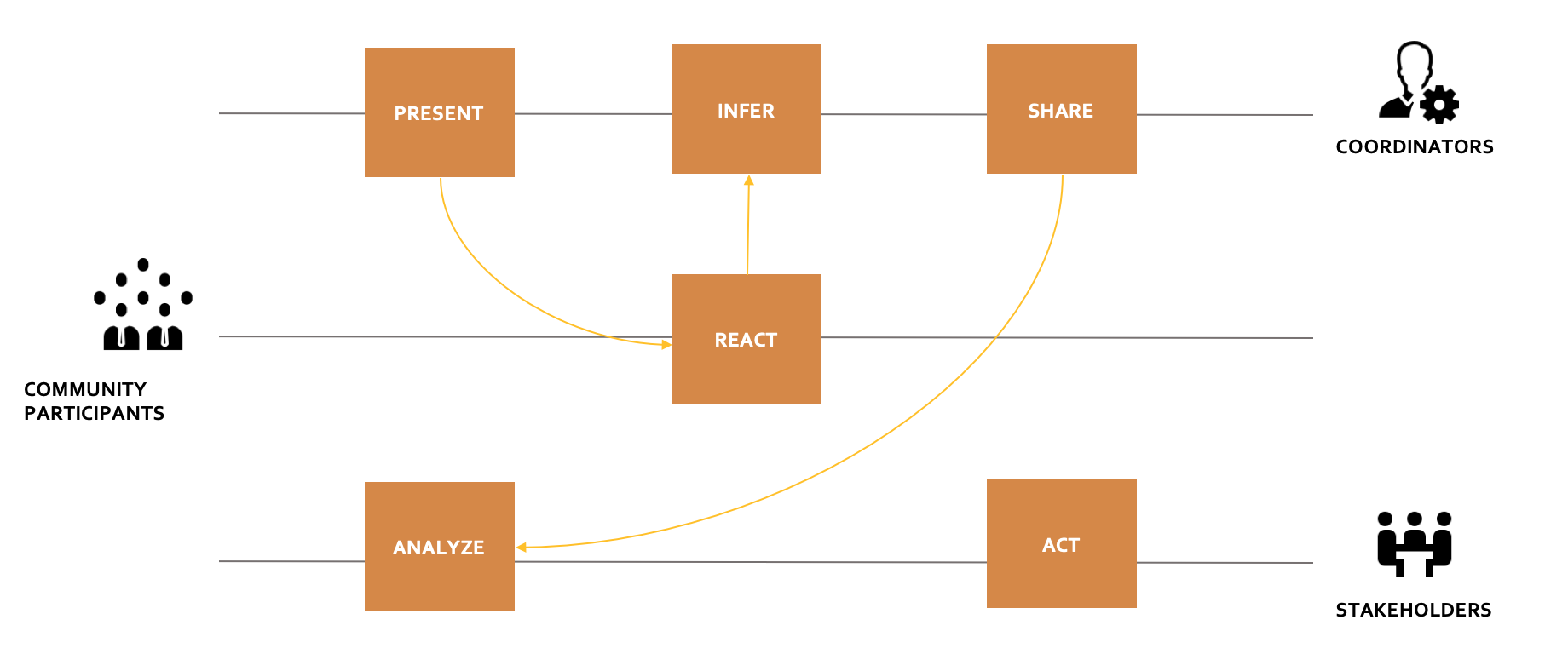
Present and Prompt: Side-by-side view of the topic and related questions.
Base and Branch: Based on the response, dive deeper or branch broader.
Create and Share: Create Reports and share a set of views with questions and the scores.
Analyze and Infer: Sentiment analysis, Word clusters, and Keyword mapping.
Features
-
Inclusive dialogue, i.e., two-way communication. Mere questions, thoughts, and ideas may be inconceivable. But when this is presented in the form of a brief write-up, a speech, or a video, it provides the required perspective and magnitude. Following it with a prompt channelizes the thought process.
-
Various types of Forums - registered forums for ideas/ proposals and anonymous forums for free feedback.
-
Various types of artifacts - Any file format of audio, video and image files.
-
Robust Report Builder - comes with a standard report with various views depending on the question type, and supports creating new views and reports from a "pivot data."
-
Real-time Reports with AI analysis - As the responses get submitted, the report reflects the real-time data and automatically infers through the AI engine. Clustering, sentiment analysis and dynamic clustering based on the input provided are enabled to understand the reactions and take informed decisions.
-
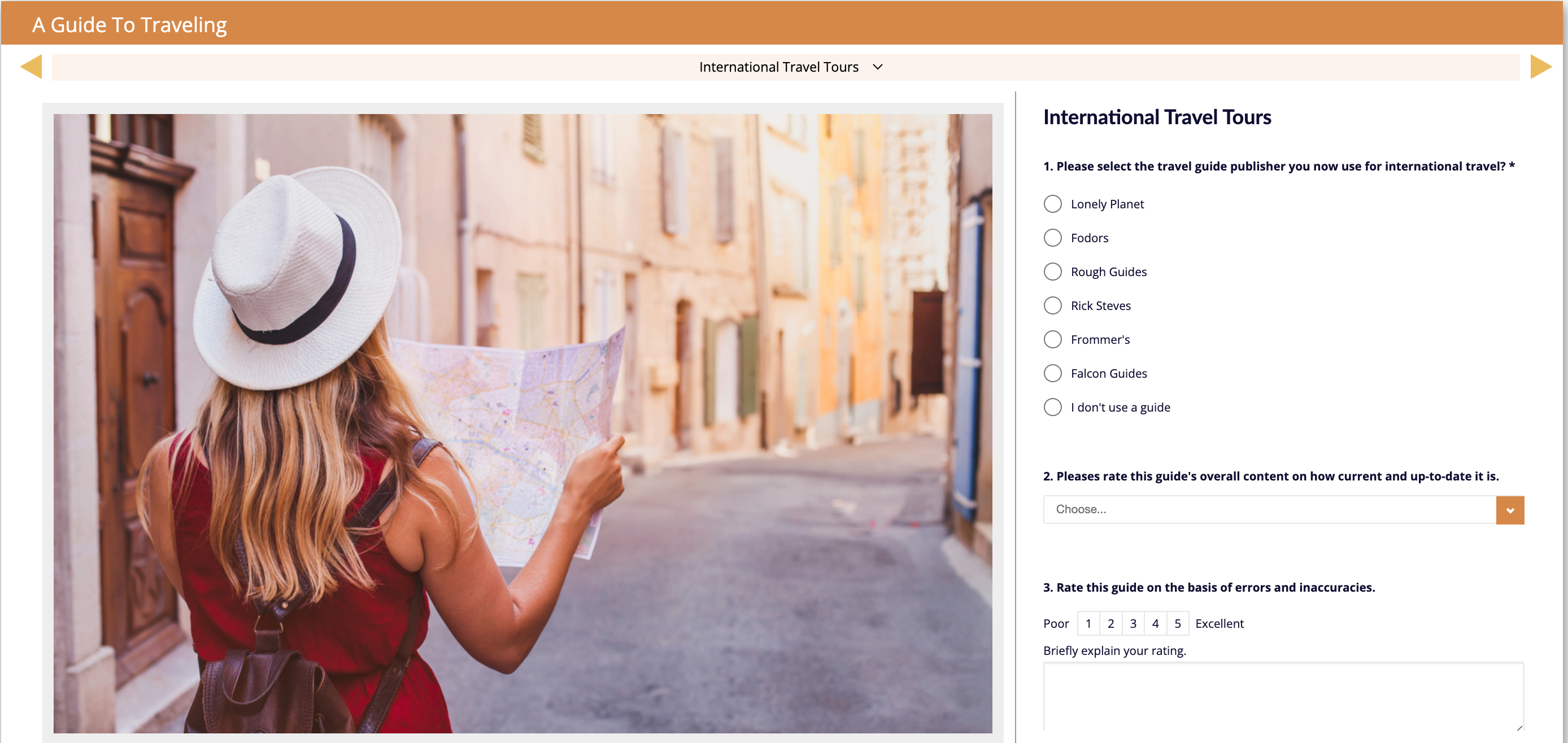 Mere questions, thoughts and ideas may be inconceivable. But when it is presented in the form of a brief writeup, a speech or a video, it provides the required perspective and magnitude. Following it with a prompt channelizes the thought process.
 -
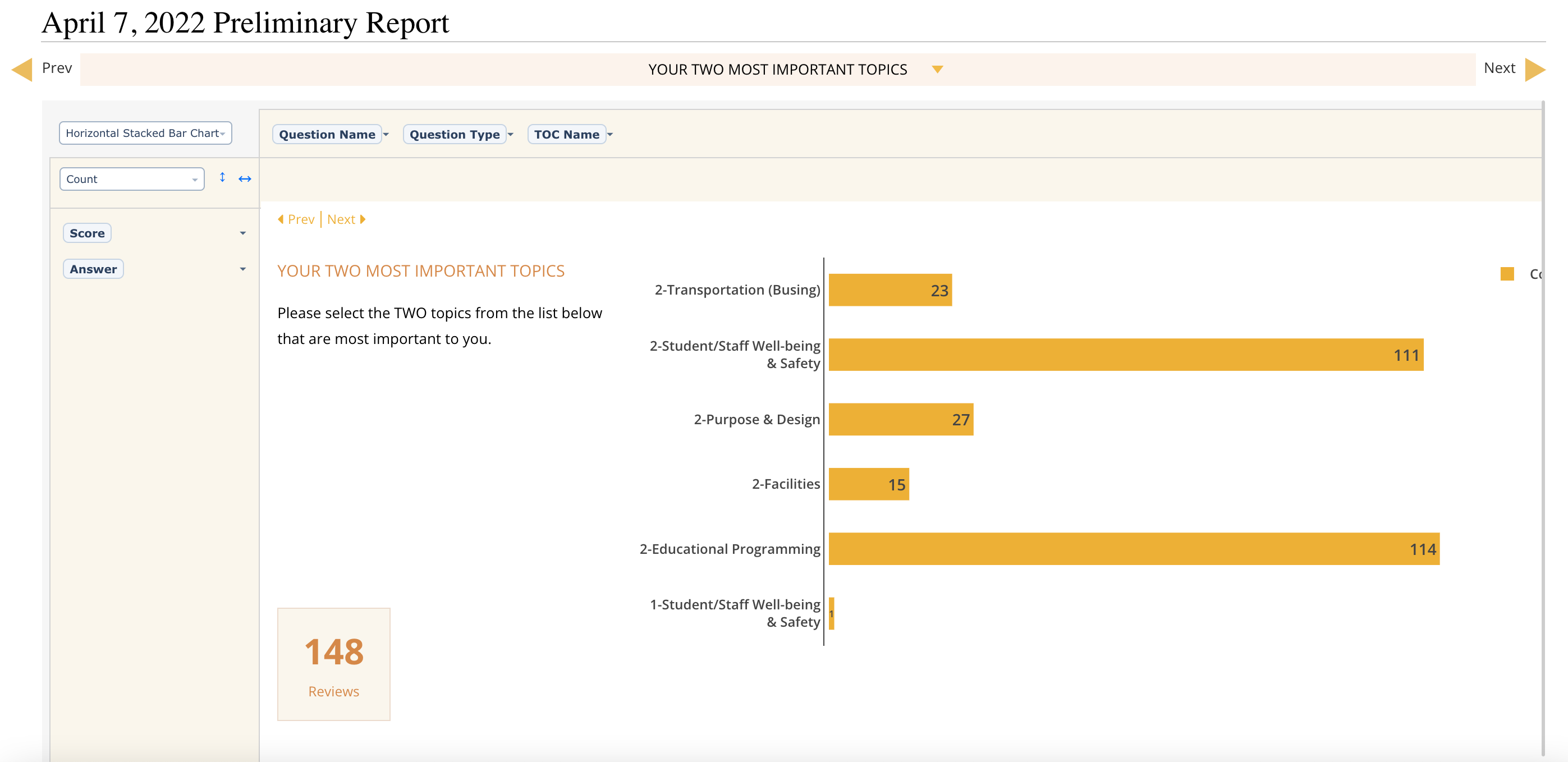 Real-time autogenerated reports with scores. The reports are interactive and support further filtering.
 -
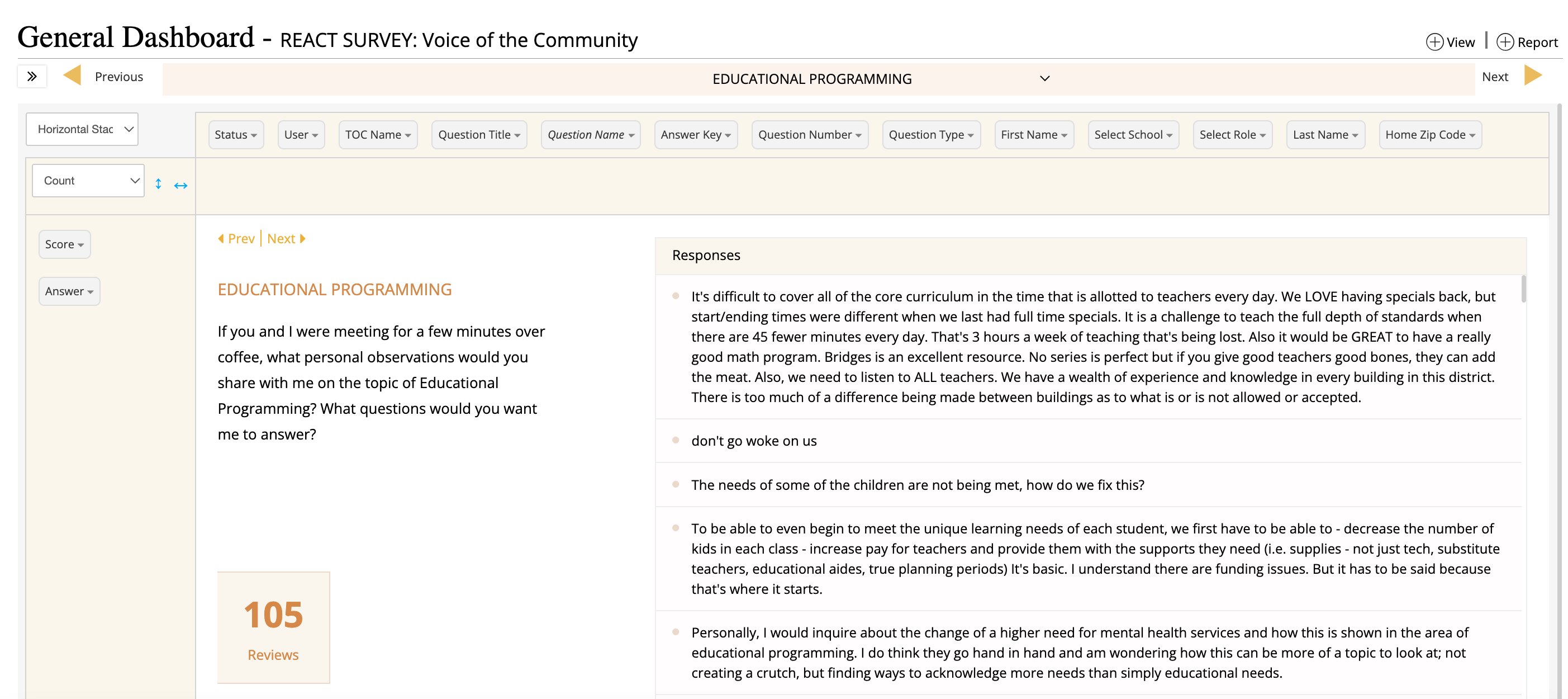 Based on the question type, the system automatically creates the required view. It also provides you with a pivot table where you can create your own views.
 -
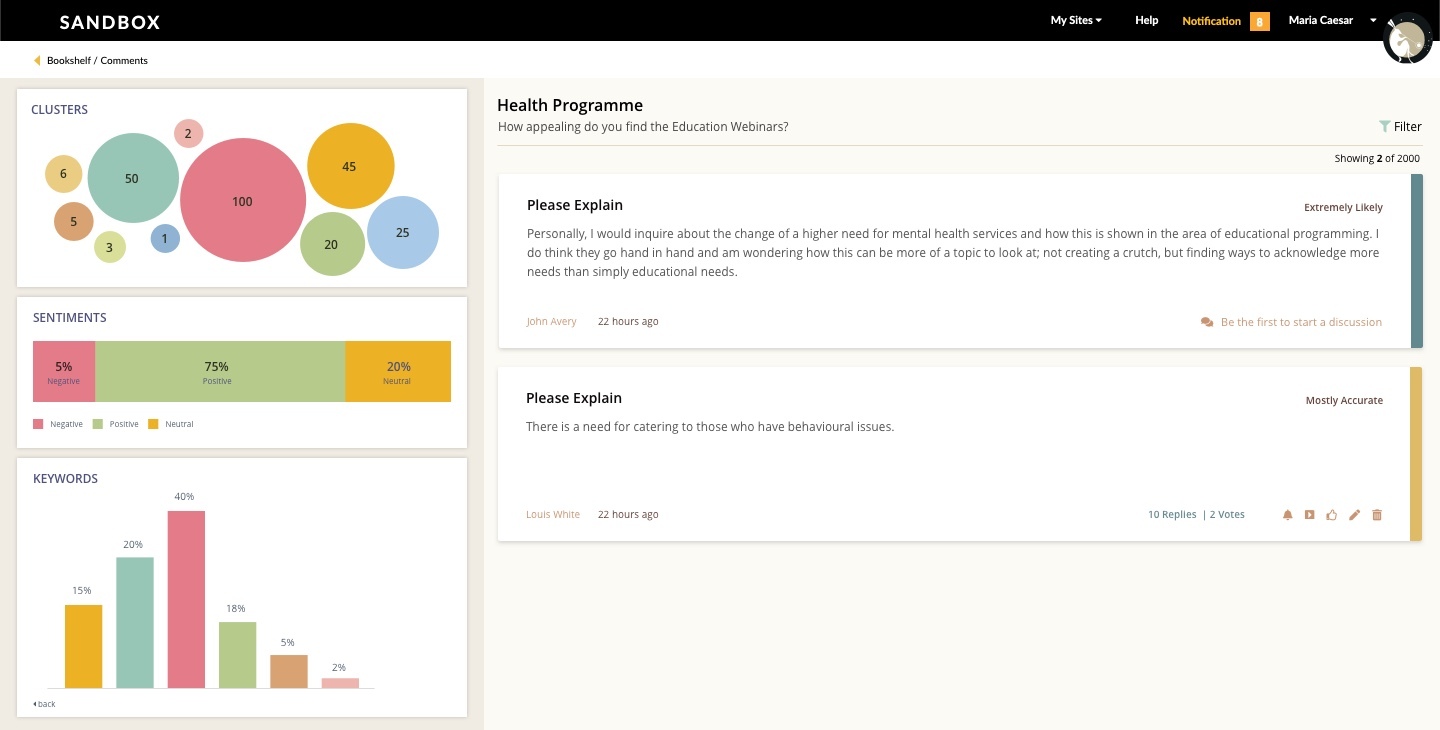 AI Analytics provisions clusters with common responses and sentimental analysis. You can also create clusters based on what word or phrase you are looking for. Clicking on a cluster/sentiment will display a filtered response on the right.
Reviewer Recommender
The recommender searches for reviewers based on the manuscript title, keywords, category, references and make suggestions for reviewer selection.
Pre-publication Review
Feel the market by sending out the manuscript while it is getting prepped for Interactive-Newsletters.
#Roadmap #onthemake


See REACT in action
Locations
Suite A.110
459 N. Gilbert Road,
Gilbert, AZ 85234
USA
459 N. Gilbert Road,
Gilbert, AZ 85234
USA
1 Sophia Rd,
#07-17 Peace Centre,
Singapore 228149
#07-17 Peace Centre,
Singapore 228149
30, MGR Salai, Chennai 600041, India


© 2025, PageMajik Inc. All rights reserved.